Toshiba Smart Window Air Conditioners offer efficient cooling with modern smart home integration, making them a compelling option for individual rooms. These units typically feature a sleek design, touch controls, and a compact remote, complementing various home decors. For instance, an 8,000 BTU Toshiba unit can effectively cool areas up to 350 square feet, often achieving noticeable temperature differences within minutes of activation.
General Overview of Air Conditioner Technology
An air conditioner removes heat and humidity from a room, creating a cooler indoor environment. This process uses a refrigerant that cycles through coils, absorbing heat indoors and releasing it outside. Air conditioning technology has evolved significantly since the early 20th century, from large industrial systems to today’s compact, efficient units.
Modern air conditioners include central air systems, mini-split units, portable ACs, and window air conditioners. Window units are self-contained systems installed directly into a window opening, providing localized cooling for a single room. They are popular for their affordability, ease of installation, and effectiveness in smaller spaces. Today’s window air conditioners also integrate advanced technologies like Wi-Fi connectivity, offering remote control and smart home integration, enhancing their functionality beyond simple cooling.
How to Choose the Right Air Conditioner for Your Home
Selecting the perfect air conditioner requires a thoughtful assessment of your specific needs and the unit’s capabilities. An informed decision ensures optimal cooling, energy efficiency, and overall satisfaction for years to come.
Determine Usage Needs
The first step is understanding your space. The cooling capacity of an air conditioner is measured in British Thermal Units (BTUs), and matching the BTU rating to your room’s size is crucial for efficient operation. An undersized unit will struggle to cool, while an oversized one will cycle too frequently, wasting energy and leading to inconsistent temperatures and poor dehumidification. For example, an 8,000 BTU unit is ideal for spaces up to 350 square feet. Consider the number of occupants, as more people generate more heat, and how frequently the room is used. Rooms with large windows facing the sun or on upper floors may require slightly higher BTU ratings.
Important Features to Consider
Beyond basic cooling, modern air conditioners offer many features to enhance comfort and convenience. Energy efficiency is paramount, with ENERGY STAR certified models using less electricity. Many units, including Toshiba’s smart window air conditioners, incorporate an ECO mode that automatically adjusts fan speed and compressor operation to save energy when the desired temperature is reached.
Smart features, such as Wi-Fi connectivity, allow you to control your air conditioner from anywhere using a smartphone app or integrate it with voice assistants like Amazon Alexa and Google Assistant. This means you can cool your room before you arrive home or set schedules for optimal comfort. Look for features like multi-speed fans, 4-way air direction control for even air distribution, and a dehumidification mode for muggy conditions. Sleep mode, 24-hour timers, and a filter clean warning light further contribute to a personalized and low-maintenance experience.
Comparing Reputable Air Conditioner Brands
|
Our Picks for the Best Air Conditioner in 2026
As an Amazon Associate I earn from qualifying purchases.
|
||
| Num | Product | Action |
|---|---|---|
| 1 | Midea 5,000 BTU EasyCool Small Window Air Conditioner - Cool up to 150 Sq. Ft. with Easy-to-Use Mechanical Controls and Reusable Filter, Perfect for Small Bedroom, Living Room, Home Office |

|
| 2 | Evaporative Air Cooler with Remote & Timer, 2200+ CFM Portable Fan That Blows Cold Air for Large Room, Home Office, Bedroom - 2.1Gal High-Capacity Tank, 3 Modes, Whisper Quiet 30dB & Sleep Mode |
|
| 3 | Windowless Portable Air Conditioners with Remote, Ventless Ac Unit Ductless Air Cooler,Hoseless Quiet Evaporative Oscillating Swamp Cooler,12H Timer & 4 Ice Box for Room Indoor Outdoor Office Bedroom |
|
| 4 | Dreo Tower Fan for Bedroom, 2026 Upgraded DC Motor, 28ft/s High Velocity, 20dB Ultra Quiet Standing Fan, 8 Speeds 4 Modes, 90° Oscillating Bladeless Fan for Indoors, Floor Fans with Remote, Black |
|
| 5 | Portable Air Conditioners, 3-IN-1 Swamp Cooler, Evaporative Air Cooler,Remote & Touch Control, 90°+90° Oscillation,LED Screen, Air Coolong Fan for Outdoor Indoor |
|
| 6 | 24" Windowless Portable Air Conditioner, 15H Timer & 120°Oscillation, 3-IN-1 Portable AC Unit with Remote, 2-Gal Tank, 3 Modes & 3 Speeds, Ultra-Quiet Ventless Swamp Cooler for Home Office, Off |
|
| 7 | BLACK+DECKER Window Air Conditioner 10000 BTU, AC Window Unit Cools Up to 450 Square Feet, Window AC Unit with Remote Control, 3 Cooling Speeds and Fan Only Function, BD10WT6, White |
|
| 8 | Dreo Tower Fan for Bedroom, 42 Inch 120° Oscillating Fan, 25dB Quiet DC Motor, 28ft/s Velocity Bladeless Standing Fan with 12 Speeds, 4 Modes, 12H Timer Cooling Fans for Home, Living Room |
|
| 9 | SereneLife Portable Swamp Cooler Air Conditioner - 2500 CFM Airflow, 8 Gallon Water Tank Portable Evaporative Air Cooler for Room & Outdoors, WiFi, Humidifier & Fan Modes, Ice Packs & Remote Included |
|
| 10 | Windowless Portable Air Conditioner, 24.4" Small Evaporative Air Cooler for Room No Window, 3-Speed Settings, 4 Modes, 7H Timer, Remote Control, 4 Ice Packs, Quiet AC Unit for Bedroom, White |
|
While many brands produce window air conditioners, Toshiba stands out for its blend of innovation and reliability, particularly in its smart window AC lineup. When comparing brands, consider their reputation for durability, customer service, and features offered. Toshiba window units, especially in the 8,000 to 12,000 BTU range, often receive positive feedback for cooling efficiency and smart capabilities. Other leading brands in the smart window AC market include LG (Dual Inverter technology), Windmill (WhisperTech models), GE (quiet operation), and Midea (U-shaped design). Each brand offers distinct advantages, but Toshiba generally provides a solid combination of performance, smart features, and value.
Review: Toshiba Smart Window Air Conditioner Quality
Toshiba’s Smart Window Air Conditioners are designed for efficient cooling with modern smart home integration. These units typically boast a sleek, contemporary design, often featuring a unique touch control interface and a compact remote, complementing various home decors.
The core of their appeal lies in performance and smart functionalities. Toshiba’s 8,000 BTU Smart Window Air Conditioner, for example, is capable of cooling areas up to 350 square feet effectively. Users frequently report fast room cooling, feeling a noticeable difference in temperature within minutes of activation. The units offer four speeds for cooling, ventilation, or dehumidification, along with a fully automatic mode and 4-way air direction control, allowing for customized airflow. Many models are ENERGY STAR certified and include an ECO mode, 24-hour timer, and sleep mode, which contribute to energy savings and personalized comfort.
Smart capabilities are a significant highlight, with Wi-Fi connectivity enabling control via a smartphone app from virtually anywhere. Integration with Amazon Alexa and Google Assistant allows for voice command operation, adding another layer of convenience. While the app setup is generally straightforward, some users have noted minor issues, such as the app defaulting to Celsius or occasional compatibility problems with specific Android versions.
In terms of noise, customer experiences vary. Some users praise Toshiba window ACs for their quiet operation, considering them suitable for bedrooms and libraries. Others, however, find them a bit loud, particularly on lower fan settings or when the compressor cycles. Toshiba is committed to noise reduction, with some indoor units operating as low as 20 dB(A), though window units can be inherently louder than split systems.
Installation is generally described as quick and easy, with an intuitive installation panel kit included. However, some users have reported challenges with fitting the units into certain metal-frame windows. Durability and consistent performance are generally positive, though a few reviews mention concerns about proper drainage or inconsistent cooling over time. Toshiba provides a 1-year limited warranty, offering peace of mind. Overall, Toshiba Smart Window Air Conditioners are often viewed as a good value for their price, combining solid cooling performance with desirable smart features.
Buying Guide: Expert Tips for Choosing an Air Conditioner
Navigating the market for an air conditioner can be daunting, but with expert advice, you can avoid common pitfalls and maximize your investment. Understanding what to look for and what to avoid is key to long-term satisfaction.
Common Mistakes When Choosing an Air Conditioner
One of the most frequent errors is selecting an air conditioner with an incorrect BTU capacity for the room size. A unit that is too powerful will short-cycle, leading to inefficient cooling, higher humidity, and increased wear and tear. Conversely, an underpowered unit will run constantly without effectively cooling the space, wasting energy and failing to provide comfort. Another mistake is prioritizing only the lowest price without considering energy efficiency ratings (like ENERGY STAR certification) or the total cost of ownership over the unit’s lifespan. Cheaper models might have higher running costs. Many buyers overlook the importance of researching features and technologies, such as smart connectivity or specialized modes, which can significantly enhance the user experience.
Tips for Efficient and Energy-Saving Air Conditioner Usage
Once your Toshiba Smart Window Air Conditioner is installed, several practices can help you use it more effectively and save on electricity bills.
- Adjust Temperature Mindfully: Set your thermostat to a comfortable yet energy-efficient temperature, typically around 78°F (25°C) when home. Avoid setting it too low, as each degree cooler can significantly increase energy consumption. The smart features of Toshiba ACs allow you to easily adjust settings remotely.
- Regular Cleaning and Maintenance: A dirty air filter restricts airflow and reduces efficiency. Clean or replace your air filter every few weeks during heavy use. Toshiba units often include a filter clean warning light to remind you. Ensure that the coils are free of dust and debris, as clean coils improve heat exchange.
- Utilize Smart Modes and Timers: Take advantage of the ECO mode, sleep mode, and 24-hour timer features on your Toshiba Smart Window Air Conditioner. ECO mode intelligently cycles the fan and compressor, while sleep mode adjusts the temperature gradually overnight for comfort and energy savings. The timer allows you to program the unit to turn on or off at specific times, ensuring cooling only when needed.
- Combine with Fans: Using a ceiling fan or box fan in conjunction with your air conditioner can help circulate cool air more effectively throughout the room, allowing you to set the AC thermostat a few degrees higher without sacrificing comfort. This synergy can lead to considerable energy savings.
- Seal Windows and Doors: Prevent cool air from escaping and warm air from entering by ensuring windows and doors are properly sealed. Use weatherstripping or caulk around window frames where the AC is installed to minimize air leaks.
> “Optimizing your air conditioner usage isn’t just about saving money; it’s about extending the life of your unit and maximizing your comfort. Small habits like regular filter cleaning make a huge difference.” – Michael Chen, HVAC Specialist at ReviewTenda.com
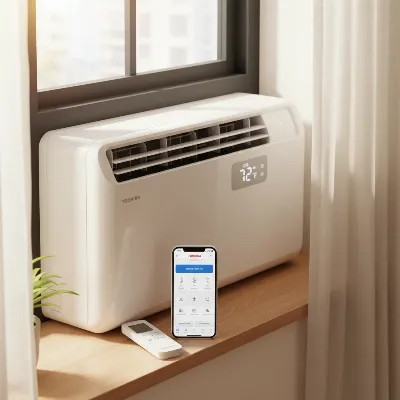 Toshiba Smart Window Air Conditioner with remote control and smartphone app on screen.
Conclusion
The Toshiba Smart Window Air Conditioner is a compelling option for effective, convenient, and relatively efficient cooling solutions for individual rooms. With its powerful cooling capacity, contemporary design, and a suite of smart features including Wi-Fi connectivity and voice assistant compatibility, it delivers a modern air conditioning experience. While some users have noted mixed experiences with noise levels and app consistency, the overall sentiment points towards a reliable unit that offers good value. By embracing Toshiba’s smart technology and implementing energy-saving practices, you can enjoy a more comfortable and controlled indoor environment. What intelligent features do you prioritize in your next air conditioner purchase?
Frequently Asked Questions
How do I connect my Toshiba Smart Window Air Conditioner to Wi-Fi?
Connecting your Toshiba Smart Window Air Conditioner to Wi-Fi typically involves downloading the Toshiba AC app on your smartphone, creating an account, and following the on-screen instructions to pair your unit. The app usually guides you through selecting your Wi-Fi network (2.4 GHz frequency is often required) and entering your password to establish the connection.
Can I control my Toshiba Smart Window Air Conditioner with Alexa or Google Assistant?
Yes, many Toshiba Smart Window Air Conditioner models are compatible with Amazon Alexa and Google Assistant. After setting up the unit with the Toshiba AC app, you can enable the Toshiba AC skill or link the device in your respective smart home app (Alexa or Google Home) to control it using voice commands for functions like turning it on/off, adjusting temperature, or changing modes.
What size Toshiba Smart Window Air Conditioner do I need for my room?
The size of the Toshiba Smart Window Air Conditioner you need depends on your room’s square footage. For example, an 8,000 BTU unit is generally recommended for rooms up to 350 square feet. It’s important to consult the product specifications or a sizing chart to ensure you select a unit with appropriate BTU capacity for optimal cooling and energy efficiency in your specific space.
Are Toshiba Smart Window Air Conditioners energy efficient?
Yes, many Toshiba Smart Window Air Conditioners are ENERGY STAR certified, indicating they meet strict energy efficiency guidelines set by the EPA. They often include features like ECO mode, 24-hour timers, and sleep mode, which further help reduce energy consumption. These features work to optimize cooling output based on your needs, leading to lower electricity bills.
Frequently Asked Questions
How do I connect my Toshiba Smart Window Air Conditioner to Wi-Fi?
Connecting your Toshiba Smart Window Air Conditioner to Wi-Fi involves downloading the Toshiba AC app on your smartphone, creating an account, and following the on-screen instructions. The app guides you through selecting your 2.4 GHz Wi-Fi network and entering your password to establish the connection.
Can I control my Toshiba Smart Window Air Conditioner with Alexa or Google Assistant?
Yes, many Toshiba Smart Window Air Conditioner models are compatible with Amazon Alexa and Google Assistant. After setting up the unit with the Toshiba AC app, you can enable the Toshiba AC skill or link the device in your smart home app to control it using voice commands for functions like turning it on/off or adjusting temperature.
What size Toshiba Smart Window Air Conditioner do I need for my room?
The size of the Toshiba Smart Window Air Conditioner you need depends on your room's square footage. For example, an 8,000 BTU unit is generally recommended for rooms up to 350 square feet. Always consult the product specifications or a sizing chart to ensure optimal cooling and energy efficiency.
Are Toshiba Smart Window Air Conditioners energy efficient?
Yes, many Toshiba Smart Window Air Conditioners are ENERGY STAR certified, meeting strict EPA energy efficiency guidelines. They often include features like ECO mode, 24-hour timers, and sleep mode, which help reduce energy consumption and lead to lower electricity bills by optimizing cooling output.
What are the common issues with Toshiba Smart Window AC units?
While generally reliable, some users report mixed experiences with noise levels, particularly on lower fan settings, and occasional app compatibility issues with specific Android versions. A few reviews also mention concerns about proper drainage or inconsistent cooling over time, though these are less common.
How to Use Your Toshiba Smart Window Air Conditioner Efficiently
Optimize your Toshiba Smart Window Air Conditioner for maximum comfort and energy savings by following these expert tips.
Set your thermostat to a comfortable yet energy-efficient temperature, typically around 78u00b0F (25u00b0C) when home. Avoid setting it too low, as each degree cooler can significantly increase energy consumption. Use the smart features of Toshiba ACs to easily adjust settings remotely.
Clean or replace your air filter every few weeks during heavy use, as a dirty filter restricts airflow and reduces efficiency. Toshiba units often include a filter clean warning light to remind you. Additionally, ensure that the coils are free of dust and debris, as clean coils improve heat exchange.
Take advantage of the ECO mode, sleep mode, and 24-hour timer features on your Toshiba Smart Window Air Conditioner. ECO mode intelligently cycles the fan and compressor, while sleep mode adjusts the temperature gradually overnight for comfort and energy savings. The timer allows you to program the unit to turn on or off at specific times, ensuring cooling only when needed.
Using a ceiling fan or box fan in conjunction with your air conditioner can help circulate cool air more effectively throughout the room. This allows you to set the AC thermostat a few degrees higher without sacrificing comfort, leading to considerable energy savings.
Prevent cool air from escaping and warm air from entering by ensuring windows and doors are properly sealed. Use weatherstripping or caulk around window frames where the AC is installed to minimize air leaks, improving the overall efficiency of your unit.
Get our weekly buyer guide
Practical specs, not advice. Unsubscribe anytime.

I just installed the 8,000 BTU Toshiba Smart Window AC in my living room, and it’s a game-changer! My space is about 300 sq ft, and it cools it down so fast. The smart home integration with Alexa was super easy to set up, and I love being able to adjust it without getting off the couch. Definitely recommend for anyone needing efficient cooling.
I got this Toshiba Smart AC for my home office, which is around 250 sq ft. It does cool the room, but I’ve had some trouble getting the temperature just right. Sometimes it feels a bit too cold, and other times it struggles to maintain the setting. The smart features are cool, but I wish the temperature regulation was a bit more consistent.
After dealing with an old, noisy AC for years, upgrading to the Toshiba Smart Window AC was a revelation. The difference in how quickly it cools my 320 sq ft bedroom is amazing. Plus, the energy efficiency seems great so far. It’s a fantastic unit for anyone looking to upgrade their individual room cooling.
This Toshiba unit is pretty solid. The sleek design is a nice touch, and it doesn’t look like an eyesore in my bedroom window. The touch controls are responsive, and the compact remote is handy. My only minor complaint is that it’s a little louder than I expected on the highest setting, but it’s not a dealbreaker for the cooling power it provides.